Animated deck
Timed reveals, transitions and stage direction. Runs in the browser at 60fps.
Narro is a React library for narrative, built for you and your coding agent. A deck is source: your agent writes it, narro check tells it what is wrong, and the same file renders as an animated presentation, a static deck, a PDF, or a video.
npm create narro@latest my-storyWorking through an agent? Point it at getnarro.com/llms.txt — the dialect, every valid name, and the command that checks its work.
Live — nothing here is a screenshot
Left: what you or your agent types. Right: what it is, the moment it is typed. One source, rendered as a deck, a chart that queries, a film.
Six weeks in, the roadmap was fiction. Here is what it cost us.
One recording did what four dashboards could not.
So we rebuilt around it.
AI-first
A deck is source, so an agent can write one — and then, unlike a slide editor, actually check its work. Narro publishes the documentation, the closed sets of valid names and the component types as machine-readable files, and ships the loop that turns a wrong deck into an error message. The four runs below are how Narro’s own pitch was written; every file they name is in the repository.
Read https://getnarro.com/llms.txt. Write our pitch as one deck.md — a table for the competitor slide, a diagram fence for the agent loop — then run npx @getnarro/cli check deck.md --fit until it passes.
markdown mode · one file, nothing to scaffold
---
title: Narro
template: ./narro.template.ts
layout: title
---

# A deck is text.

So it diffs. It reviews. It regenerates.
$ npx @getnarro/cli check deck.md --fitdeck.md looks good · 21 slides fit the canvas
Now pull every color and size out of deck.md into a template beside it. Name the layouts after what they do, and put a footer and a slide number on every slide except the title.
a deck template · the slide master, as data
export default {
  tokens: { colors: { signal: "#ff5c38" } },
  master: {
    footer: { text: "{title} · {date}" },
    slideNumber: { format: "{n} / {total}", from: 2 },
  },
  layouts: { chapter: { base: "section" } },
} satisfies DeckTemplate;
$ npx @getnarro/cli check deck.mdtemplate: narro-pitch · 12 layout ids the deck may name
Rebuild it in React, and make the closed-set slide real: import builtinLayoutNames from @getnarro/markdown and check whatever I type against it, live, with the near-miss suggestion.
React mode · for the one slide a picture cannot make
import { builtinLayoutNames } from "@getnarro/markdown/layouts";

const nearest = [...builtinLayoutNames]
  .sort((a, b) => distance(typed, a) - distance(typed, b))[0];

return `✗ "${typed}" is not a layout. Did you mean "${nearest}"?`;
$ pnpm --filter @getnarro/pitch-deck test4 tests passed · the nine names come from the import, not the slide
Take the six strongest beats and make a sixty-second video out of them. Narration only — do not type a single duration, and give me 16:9 and 9:16 from one layout.
@getnarro/video · every duration measured, none typed
export const script = defineScript({
  voice: "af_heart",
  cues: [
    { id: "hook", text: "A deck is text.", scene: "title" },
    { id: "climb", text: "You climb it without rewriting the deck.",
      scene: "ladder", hold: 12 },
  ],
});
$ npx narro-video check .no overflow in landscape or vertical · runtime 1:00, measured
Read https://getnarro.com/llms.txt, then write
the Q3 review to deck.md and run
npx @getnarro/cli check deck.md --fit
until it passes.No plugin, no configuration. The docs are tested this way too: an eval hands a model llms.txt and nothing else, then puts the deck it writes through narro check and narro build.
The deck itself
This is Narro’s own pitch, running here rather than pictured here — the same build narro build deck.md produces, embedded unmodified. Twenty-one slides, written as one markdown file with a slide master beside it: every color, rail, footer and slide number below comes from that one template, and not one of them is in the deck.
One source, six destinations
Timed reveals, transitions and stage direction. Runs in the browser at 60fps.
Same story, built to files you can host anywhere or hand over.
Point it at a markdown deck. Headings become slides, frontmatter becomes props.
Slides are components. Hooks, state, effects, your own charts and canvases.
MP4, timed by the narration rather than by a timeline. Edit a sentence, and the cut moves with it.
One page per slide, every fragment revealed. The version that gets forwarded.
Video
A composition is React and its narration is a list of sentences. Each one is synthesized and measured, so a scene is as long as what is said in it — and there is no timeline to maintain. Change a word and the cut moves, the captions re-page and the .srt regenerates. Nothing is re-cut, because nothing was cut by hand.
export const script = defineScript({
  voice: "af_heart",
  cues: [
    { id: "hook", scene: "title",
      text: "A deck is just text." },
    { id: "claim", scene: "title",
      text: "So is a video." },
  ],
});
The durations live nowhere in this file, and nowhere in any other. They are what the audio measured.
How the video pipeline works →A render is split into scene-aligned pieces, each keyed on its own source, narration, brand and settings. Rewrite one sentence and one scene re-renders.
Frozen holds, dead air, pace, caption contrast, the band a platform draws its own chrome over. Every finding names the sentence at fault and the file that decides it.
Kokoro runs offline and needs no key. Bring ElevenLabs, OpenAI or a local model instead, clone your founder’s voice once, or give a cue a second speaker.
A screen recording as a JSON spec, captured on virtual time so two takes match frame for frame. --check re-records and tells you the product moved.
Every sentence can cite its source. The render ships the claims manifest, and this says which cited page has changed since — so the library cannot quietly go out of date.
The German runs thirty percent longer and nothing is re-cut: each scene grows to fit its own narration, and the captions and the .srt follow.
Recording
narro record captures what a page is made of — the DOM as it stood, every change that followed, and the bytes of everything it drew with — and replays it as real DOM. Sharp at any projector size, kilobytes rather than megabytes, and embeddable in a slide, a site, or one file you email.
The player, the recording and every font and image it draws with, in a single HTML file that opens from a USB stick. No server, no network, nothing to embed.
The player is the same bytes for every demo, so it loads once. A page then pays for the event stream — tens of kilobytes for a flow.
src: /demo.narrocast and it plays on the slide, at any projector size, with a still for the PDF export that cannot run JavaScript.
A replay with no cursor shows the result of a click and never the click. Recorded flows draw the pointer, and optionally the line it took.
Terminal
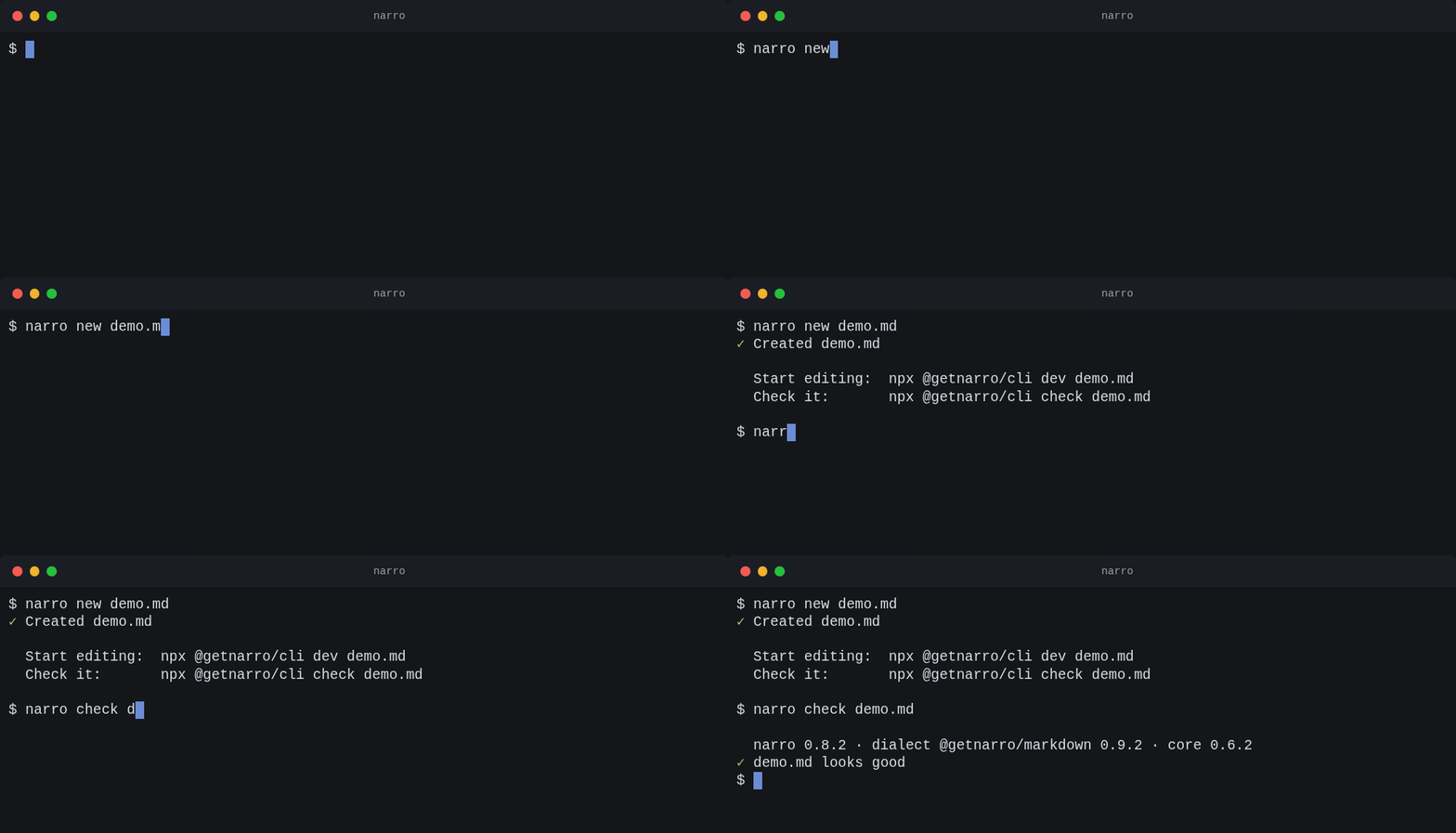
A session is a file: the commands, the pauses, the moments worth naming — and, once you have run it, the bytes they actually printed. Because it is text, it diffs, it re-themes, it renders at any size, and CI can tell you the demo no longer matches the tool. Write it, or perform it once with tape and get the file for free. Rendering never runs anything; only record does, and it asks first.
$ narro new demo.md
✓ Created demo.md

  Start editing:  npx @getnarro/cli dev demo.md
  Check it:       npx @getnarro/cli check demo.md

$ narro check demo.md

  narro 0.8.2 · dialect @getnarro/markdown 0.9.2 · core 0.6.2
✓ demo.md looks good
$
Type "npm create narro@latest my-deck"
Enter
Wait /Scaffolded/
Mark ready
VHS syntax, so a demo you already wrote imports unchanged — plus the four directives it has no equivalent for: a mark, a mask, a cue and an expectation.
Or skip writing it: narro-terminal tape demo.tape opens a shell, and when you exit it has written this from what you typed — and the playbook and capture from what the commands printed.
Re-runs the commands and diffs what they printed against the capture beside them. A GIF regenerates happily after the tool stopped saying what the demo says; this exits 1 and names the command.
Use a real shell and exit. What you typed becomes the tape; what the commands printed lands in the playbook and the capture. Typos are folded away, long pauses capped, and nothing runs twice.
Differenced frames, a palette counted rather than guessed, per-frame delays, and a --max-mb ladder that retries until it fits. No ffmpeg.
Rows are interned and referenced, so a text session is usually smaller as vector than as a GIF. Nothing is rasterized, so it renders where Chrome cannot be installed.
One script tag, 14.7 KB gzipped, no framework. The page ships the playbook and plays it — seekable, selectable, and re-themable from the same file.
Paste a transcript, or write a tape. Resolved at build time to positioned HTML, so it works in a deck, a PDF and a PPTX with nothing to load — and it never runs anything.
asciicast v2 and v3, VHS .tape files and ttyrec, read by what is in the file rather than its name. Export writes asciicast back out.
Zooming canvas
Put a diagram on a plane and fly a camera between named framings, so the deck moves the way the idea does. The reason nobody does this well is not the idea — it is the interpolation. Tween the center and the zoom separately, as every tool in this field does, and a flight speeds up by an order of magnitude on the way in while the numbers insist it is slowing down. That mismatch is what the audience feels.
3.54×variation in perceived speed across the flight
1.00×variation in perceived speed across the flight
Same two waypoints, same duration, same frame. The only difference is the path between them.
```atlas
scene: /diagram.svg
---
- id: whole
  at: 960, 540, 1920
- id: storage
  at: 1250, 545, 340
  hold: 2
```
A waypoint frames a rectangle in world units, never a zoom level — so the same path frames the same content in a 16:9 deck, a vertical video and a phone. Leave the duration out and the camera works out how long the move wants to take from how far the picture actually travels.
Zooming canvas →A zoom jump past 8×, a duration nowhere near what the move needs, a framing that cannot be rendered, a selector that matches nothing. narro check reports all of it before anyone sees the deck.
One composited transform, whatever the scene holds. will-change is switched on for the move and off on arrival, so the frames anyone actually reads are re-rastered and sharp.
A viewer who asks for less motion gets a cut between waypoints. Every framing stays reachable; only the swoop goes.
The camera is a pure function of the frame, so a rendered frame is identical alone, out of order, or on another machine. No requestAnimationFrame anywhere in the render.
The primitives
Narro ships the beats a story is made of, so pacing is something you write down instead of something you hope for on the day.
A slide that holds keeps the room on the problem.
<MotionStep> lands the answer on your cue.
Silence you can schedule, in milliseconds.
Break your own grid on purpose, once.
The ask, and where it leaves them.
Examples
Docs
npm i @getnarro/core @getnarro/cliAdds @getnarro/core and the CLI. React 18+ and Node 20+.
import { Motion, Notes, Presentation, Slide }
  from '@getnarro/core';
import { Heading, Text } from '@getnarro/shared-ui';

export default function Story() {
  return (
    <Presentation aspectRatio="16:9">
      <Slide id="intro">
        <Heading>We shipped the wrong thing.</Heading>
        <Notes>Slow down here.</Notes>
      </Slide>
      <Slide id="fix">
        <Motion effect="slide-up" delay={0.8}>
          <Text>Here is what we learned.</Text>
        </Motion>
      </Slide>
    </Presentation>
  );
}narro dev story.tsx
Opens the stage with hot reload, speaker notes and a presenter clock.
narro build
narro export --pdf
narro export --to pptx
Same source, every artifact. Nothing to re-lay-out by hand.
The root of a story. Owns navigation, routing and the viewport scaling that keeps a deck legible from a laptop to a projector.
One frame of the story. Any React tree inside, including your own components.
Timing components. They read the slide’s activation state, so a beat behaves the same on stage, in a static export and under a video render.
Read and drive the story from inside your own components.
One binary for the whole loop: author, check, present, export.
Front matter maps onto deck and slide props, so a markdown deck can grow into a React one without a rewrite.
<Slide id> takes.---
title: Q4 roadmap
theme: default
aspectRatio: "16:9"
---
# We shipped the wrong thing. {.text-7xl}
- Six weeks
- Two rewrites
- One good lesson
<!-- notes: Lead with the cost, then the lesson. -->